
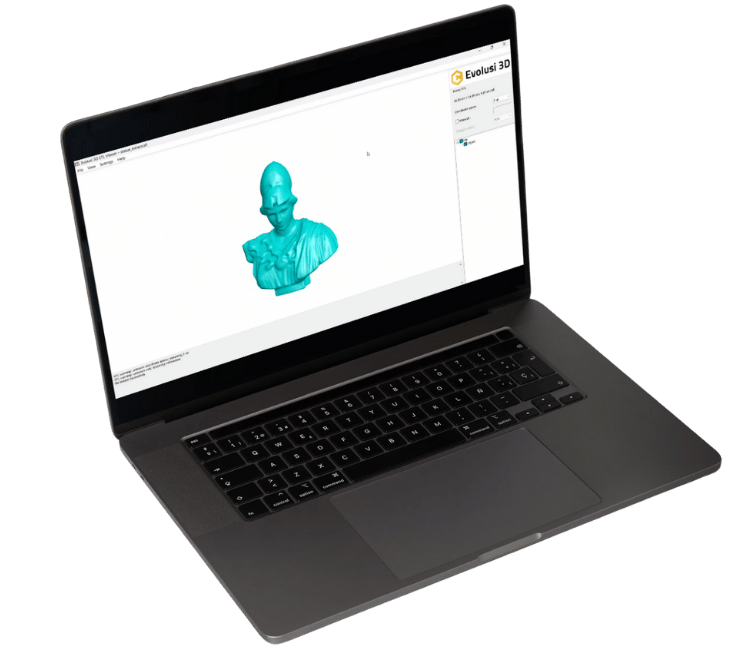




Buka Semua File STL tanpa masalah, ketika yang lain gagal

Evolusi
STL Viewer

Key Features

Mendukung custom warna​

Pemasangan Aplikasi yang Gampang​

Navigasi File STL Dalam Satu Folder Dengan Mudah​

Mendukung custom warna​

Evolusi STL Viewer Performance

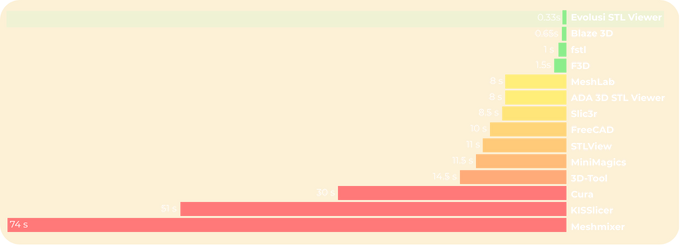
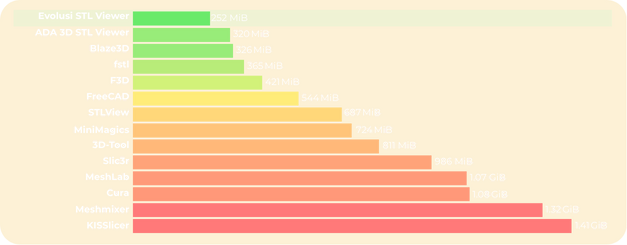
Bandingkan performa Evolusi STL Viewer dengan yang lainnya dengan file 116 MiB STL ini

Loading time

Memory demand​

Benchmark Details
  • Core i7 860 with 8 GB of RAM; AMD Radeon HD 5700; Windows 7 x64.
  • Programs were run thrice; the best numbers were recorded.
  • Loading time begins with launching the program with the file as parameter, and ends with the first UI response to user input.
  • Memory demand is the peak working set during loading time.
  • One second has been subtracted from MeshLab’s loading time for manually closing the remove duplicate vertices prompt.

Testimoni Pengguna

Aplikasinya ringan untuk dipakai di PC, fiturnya juga cocok untuk keperluan 3D secara profesional

Gerald
Engineer
mempermudah membuka software dengan format stl, ditambah dapat mengukur dimensi secara otomatis

Fadhil
Engineer

Softwarenya praktis dan efesien

Dipta
Engineer
Aplikasi ringan, di low-spec pun bisa melihat file 3d tanpa lag sehingga tidak perlu program berat untuk membuka stl.

Raymond
Engineer

One-Time Purchase, Active for Lifetime

GAK PUAS DENGAN EVOLUSI STL VIEWER?

MONEY BACK, GUARANTEE

*Syarat dan Ketentuan Berlaku

Subscribe Berita Terbaru dari Kami